Easy Steps to Report and Delete a Fake Instagram Account - Protecting Your Online Identity
Instagram is a popular social media platform with millions of active users. However, it is not uncommon to find fake accounts on this platform that impersonate genuine users or businesses. These accounts can be harmful as they can mislead, deceive, and even scam unsuspecting individuals. This article will give you a step-by-step guide on how to report and delete a fake Instagram account.
Why Report and Delete a Fake Instagram Account?
Fake Instagram accounts can cause all sorts of problems for legitimate users of the platform. Cybercriminals often create these accounts to collect sensitive information from their followers or to scam them out of money. In some cases, they may even pretend to be someone else to tarnish their reputation.
It's important to report and delete these accounts as soon as possible to protect yourself and others from being victimized. Besides, Instagram's community guidelines prohibit the use of fake accounts, so it's your responsibility as a user to flag them when you spot one.
How to Report an Instagram Account
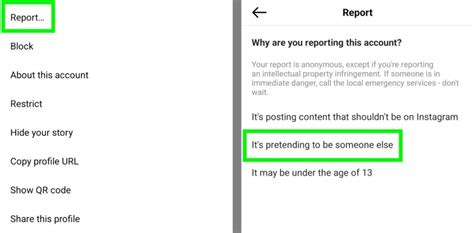
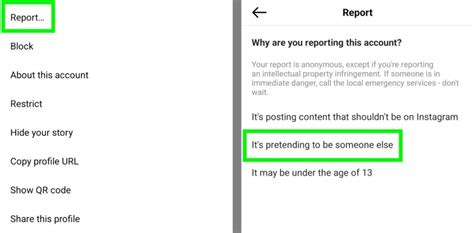
The process of reporting a fake Instagram account is straightforward and easy to follow. The first step is to visit the profile of the fake account. On the top right corner of the page, you'll see three dots arranged vertically - click on them. You'll then see a dropdown menu that includes the Report option. Click on it.
Next, Instagram will ask you why you're reporting the account. Select the reason that best describes the problem, such as this account is pretending to be someone else or this account contains inappropriate content. You'll also have the option to supply additional details if needed.
Once you've filled out the form, submit it, and Instagram will review your report. If they determine that the account violates their community guidelines, they'll take action, which could include disabling or deleting the account.
How to Delete an Instagram Account
If you're the owner of a fake Instagram account that you'd like to delete, here's what you should do. Go to your profile page and tap on the three dots arranged horizontally on the top right corner. Select Settings from the menu that pops up.
Scroll down until you see the Log out option. Click on it, and Instagram will log you out of your account. Next, go back to the login page and enter the username and password of the account you want to delete.
Once logged in, navigate to the settings page again and select Delete Your Account. Follow the prompts to confirm that you want to delete the account, and it will be permanently deleted within a few days.
Final Tips
Reporting and deleting a fake Instagram account is not just responsible behavior, but it also helps protect the integrity of the platform. Below are a few extra tips to keep in mind when dealing with these types of accounts:
- Be cautious about accepting friend requests from unknown accounts
- Avoid sharing sensitive information with strangers on social media platforms
- Report fake accounts as soon as you spot them to prevent others from falling victim to their scams
Now you know how to report and delete a fake Instagram account. By following these steps, you can help keep the platform safe and enjoyable for everyone.
"How To Report And Delete A Fake Instagram Account" ~ bbaz
Introduction
Instagram is a popular social media platform that provides an interactive interface to millions of people around the world. It allows users to share their experiences, photos, and memories with others, but sometimes, fake Instagram accounts can appear, causing issues for other users on this platform. In this article, we will guide you through the steps to report and delete a fake Instagram account.What is a Fake Instagram Account?
A fake Instagram account is created using false information with the intention to deceive others. These accounts may look legitimate, but they have no affiliation with the person portrayed in them. The profile picture, bio, and posts are all designed to trick others into believing the account is real.Why Report a Fake Instagram Account?
Reporting a fake Instagram account serves two purposes. Firstly, it helps prevent others from being fooled by the account and ensures that the rightful owner is not impersonated. Secondly, reporting a fake account enables Instagram to take appropriate action against the perpetrator.How to Identify a Fake Instagram Account
It's important to learn how to tell if an Instagram account is fake before reporting it. Here are some things to watch out for:- The user has a large number of followers but very few posts
- The profile picture may be a stock image or a picture downloaded from the internet
- The bio may contain generic statements or phrases that don't match the person portrayed in the account
- The posts may include spammy messages or links to suspicious websites
How to Report a Fake Instagram Account
If you come across a fake Instagram account, follow these steps to report it:- Tap on the three dots in the top-right corner of the account's profile page.
- Select Report and choose the reason why you are reporting the account.
- Provide additional details if prompted, including any evidence of the account's fake behavior.
- Submit your report, and Instagram will review it.
Additional Reporting Options
If you feel uncomfortable flagging a fake account through the app, use Instagram's online reporting form. You can also report the account to your local law enforcement agency or hire a specialist to handle the matter for you.How to Delete a Fake Instagram Account
Instagram takes the authenticity of its platform very seriously. Once it confirms the account as fake, Instagram will disable or delete it from its platform. If the account is verified, Instagram will usually verify the impersonated user's identity to ensure that the real account is safe and secure.How to Protect Yourself from Fake Instagram Accounts
Here are some steps you can take to protect yourself from fake Instagram accounts:- Be wary of requests to follow or interact with accounts that you don't know.
- Don't share personal information on the platform, like your full name, address, or birthdate.
- Use strong passwords and enable two-factor authentication as an added layer of security.
Conclusion
Fake Instagram accounts are becoming more prevalent, and it's essential to know how to identify them and take the necessary action against them. Reporting and deleting a fake Instagram account ensures the safety and security of the platform's users. By following these steps, you can help maintain the integrity of Instagram and enjoy a safer and more authentic social media experience.How To Report And Delete A Fake Instagram Account
Introduction
Instagram is a popular social media platform where millions of users connect, share pictures and videos, and follow their favorite celebrities and brands. Unfortunately, creating a fake Instagram account is also relatively easy. These accounts can be used for malicious purposes such as cyberbullying, identity fraud, or stalking. In this article, we will explore the steps you can take to report and delete a fake Instagram account.Spotting A Fake Instagram Account
The first step in reporting a fake Instagram account is identifying one. There are several ways to spot a fake account. Look out for these signs: 1. The profile picture looks generic.2. Low-quality images and few photos.3. No followers or only a few.4. The bio is vague or missing key information.5. Strange username with numbers and symbols.If you spot any of these signs, it is possible that you have found a fake Instagram account.Report A Fake Instagram Account
Once you have identified a fake account, you should report it to Instagram. Here is how:1. Go to the fake account's profile.2. Tap on the three dots in the top right corner.3. Select Report.4. Choose a reason why you are reporting the account.5. Follow the prompts to submit your report.Instagram says that all reports are anonymous, so the account owner will not know it was you who reported them.Provide More Information
If you feel that the report you submitted did not provide enough information, you can follow up with more details. Here is how:1. Follow the above steps to report the account.2. Select This profile violates Instagram's community guidelines.3. Provide more information about why you think the account violates the terms and conditions.Providing more information is essential to getting Instagram to take action against the fake account. If you have evidence such as screenshots or direct messages, share them as well.The Difference Between Reporting And Blocking
Reporting a profile is different from blocking it. When you block someone on Instagram, they will not be able to follow or interact with you. Reporting them is more severe as Instagram may take administrative actions against their account.Reporting vs. Blocking Feature Comparison Table
| Feature | Reporting | Blocking |
|---|---|---|
| What happens to the account? | Instagram may suspend the account or remove it. | The account owner will not be able to see your profile or posts. |
| Does the account owner know about it? | No, reports are anonymous. | Yes, the account owner will see that they have been blocked. |
| Can you undo it? | No, reports are final, but you can submit a new report later. | Yes, you can unblock the account at any time. |
Delete Your Own Account
If you want to delete your account, go through the following steps:1. Go to the Instagram website or app.2. Log in to your account.3. Click your profile icon in the top right.4. Select Edit Profile.5. Scroll down and click Temporarily disable my account if you want to deactivate your account.6. If you want to delete it permanently, click Delete Your Account.Please note that once you delete your account, you will not be able to recover it. So, be careful before making the decision.Conclusion
In conclusion, reporting a fake Instagram account is crucial for maintaining a safe and positive environment on the platform. By following the steps we have outlined, you can do your part and help keep Instagram free of fake accounts, cyberbullies, and other harmful activities. Remember to always be vigilant and report any suspicious accounts.How To Report And Delete A Fake Instagram Account
Introduction
Instagram is one of the most popular social media platforms in the world, with over 1 billion active users. However, with such a large user base comes the risk of fake accounts and other types of fraudulent behavior. If you come across a fake Instagram account, it's important to report and delete it to ensure the safety of others on the platform.Step 1: Identify The Fake Account
Before reporting a fake Instagram account, you need to be sure that it's actually fake. Look out for suspicious activity such as an unusually high number of followers or posts, inappropriate images or comments, and a profile picture that looks too good to be true. Once you've identified the fake account, take a screenshot of any evidence before reporting.Step 2: Report The Fake Account
To report a fake Instagram account, click on the three horizontal dots on the top right-hand corner of the account’s profile. From the dropdown menu, select “Report”. You will then be prompted to select the reason for your report. Select “It’s a fake account”, and follow the prompts to complete your report.Step 3: Block The Fake Account
Blocking the fake account will prevent the user from interacting with you or viewing your profile. To do this, go to the fake account’s profile, click the three horizontal dots again, and select “Block”.Step 4: Protect Your Own Identity
If you believe that your own identity has been stolen to create the fake account, you should report it as soon as possible. Go to the “Privacy and Security” section in your own Instagram settings, and select “Report Impersonation”. Follow the prompts to complete your report.Step 5: Monitor Your Account
It's important to keep an eye on your own account after spotting a fake account. Check to see if you've been tagged in any inappropriate images or received any suspicious direct messages. Report any further suspicious behavior immediately.Step 6: Educate Yourself And Others
Unfortunately, fake Instagram accounts are not going away anytime soon. To protect yourself and others, it's crucial to educate yourself and share your knowledge. Spread awareness of this issue and encourage others to report suspicious accounts to keep the community safe.Step 7: Take Legal Action If Necessary
In some extreme cases, it may be necessary to take legal action against an individual or group behind a fake Instagram account. If the behavior is particularly harmful to you or your business, seek legal advice on the best course of action.Conclusion
Reporting and deleting a fake Instagram account can be a straightforward process if you follow the right steps. Remember to gather evidence, block the account, report it to Instagram, and monitor your own account for any suspicious activity. Always prioritize your own safety and the safety of others on the platform.How To Report And Delete A Fake Instagram Account
Welcome to this guide on how to report and delete a fake Instagram account. Instagram is a popular social media platform with over one billion monthly active users. Unfortunately, some people use this platform to create fake accounts to scam or deceive others. If you are a victim of such an account, you can take action by reporting and deleting it. In this article, we will guide you through the process step-by-step.
The first thing you should do is to determine whether the account is fake or not. Fake accounts often have no profile picture, few or no followers, and little content. They may also claim to be someone they are not or ask you for personal information or money. If you suspect that an account is fake, do not engage with them in any way. Instead, follow the steps below.
Step one is to report the account to Instagram. To do this, go to the fake account's profile and click on the three dots at the top right corner of the screen. From the options that appear, select Report. Select the reason for your report and provide additional details if necessary. Instagram will investigate the account and take appropriate action.
If the fake account is impersonating you or someone you know, you should report it as soon as possible. Instagram takes impersonation very seriously and will take action to remove the account if it violates its policies. When making your report, be sure to provide as much information as possible, including your full name, username, and any other relevant details.
Step two is to block the fake account. Blocking the account will prevent the user from contacting you or viewing your account. To block the account, go to their profile and click on the three dots at the top right corner of the screen. Then select Block.
If you are receiving harassing or threatening messages from the fake account, you should report them to the police. Keep a record of all the messages and provide them to the police as evidence. If the messages contain any threats of violence, be sure to inform the police immediately.
If you want to take things further, you can hire a lawyer to help you take legal action against the person behind the fake account. This is particularly useful if the person behind the account is using your name or image to defame you or harm your reputation. A lawyer can advise you on what actions to take and represent you in court.
In addition to reporting and deleting fake accounts, you can also take steps to protect your own account from being hacked or duplicated. Some measures include using a strong password, enabling two-factor authentication, and being cautious about who you accept as followers.
In conclusion, dealing with a fake Instagram account can be frustrating and stressful. However, by taking the right steps, you can report and delete the account and prevent others from falling victim to its scams or deceptions. Remember, never engage with a suspect account, and always report any suspicious activities to Instagram or the proper authorities. Stay safe!
Thank you for reading this guide on How To Report And Delete A Fake Instagram Account. We hope that you found this helpful and informative. Please share this article with your friends and family to spread awareness about how to keep your Instagram profile safe from fake accounts.
How To Report And Delete A Fake Instagram Account: People Also Ask
What qualifies as a fake Instagram account?
A fake Instagram account can be defined as an account that impersonates someone else, has inappropriate content, or is created to spam people.
Why is it important to report and delete fake Instagram accounts?
Fake Instagram accounts can cause harm and misrepresentation of the legitimate accounts owners. It can also lead to misleading information on Instagram and encourages spamming and inappropriate behavior.
How do I report a fake Instagram account?
To report a fake Instagram account, follow these steps:
- Go to the fake account's profile
- Tap the three dots on the right-hand side of the profile page
- Select Report
- Choose the reason for the report from the available options
- Provide additional information and submit.
What happens after reporting a fake Instagram account?
After reviewing the report, Instagram will take action against the reported account, which may include disabling or deleting the account.
How do I delete a fake Instagram account?
You cannot delete a fake Instagram account as you do not have access to it. However, you can report the fake account to Instagram and let them handle it.
Can I get in trouble for reporting a fake Instagram account?
No, you cannot get in trouble for reporting a fake Instagram account. Instagram encourages users to report accounts that violate their policies and guidelines.
What else can I do to protect myself from fake Instagram accounts?
To protect yourself from fake Instagram accounts, you can:
- Ensure your privacy settings are set to a level that you are comfortable with.
- Avoid accepting friend requests from people you don't know.
- Report any suspicious activity to Instagram.
- Regularly change your passwords and enable two-factor authentication.
- Only accept messages from people you know.
Post a Comment for "Easy Steps to Report and Delete a Fake Instagram Account - Protecting Your Online Identity"